
Run your construction company from office to site in one system.
Connect projects, people, materials, equipment, schedules and costs. See real progress and real cost while the project is still running, not after it closes.
- No credit card required
- Set up in minutes
- Cancel anytime
Point-cloud illustration of a building under construction with a tower crane, and a site engineer in a hard hat holding a tablet
BOQ structurePeso-native, VAT-awarePMBOK earned valueBuilt for site teams on mobile
Your project data is scattered across six tools.
- The BOQ lives in a spreadsheet on one estimator's laptop.
- Purchase orders are approved in a group chat.
- Site progress arrives as photos and a notebook page.
- Nobody knows what the project actually cost until it is finished.
Three steps from estimate to control.
Build the BOQ.
Division, Section and Item structure with detailed unit price analysis. Materials, labor and equipment roll up into a grand total you can approve.
Plan and execute.
The approved BOQ becomes the budget. Schedule, WBS, procurement and daily site reports all reference the same items.
See the truth daily.
Earned value, cost variance, and forecast at completion recalculate as the site reports and the warehouse issues materials.
Everything a contractor actually runs on.
Estimate and budget
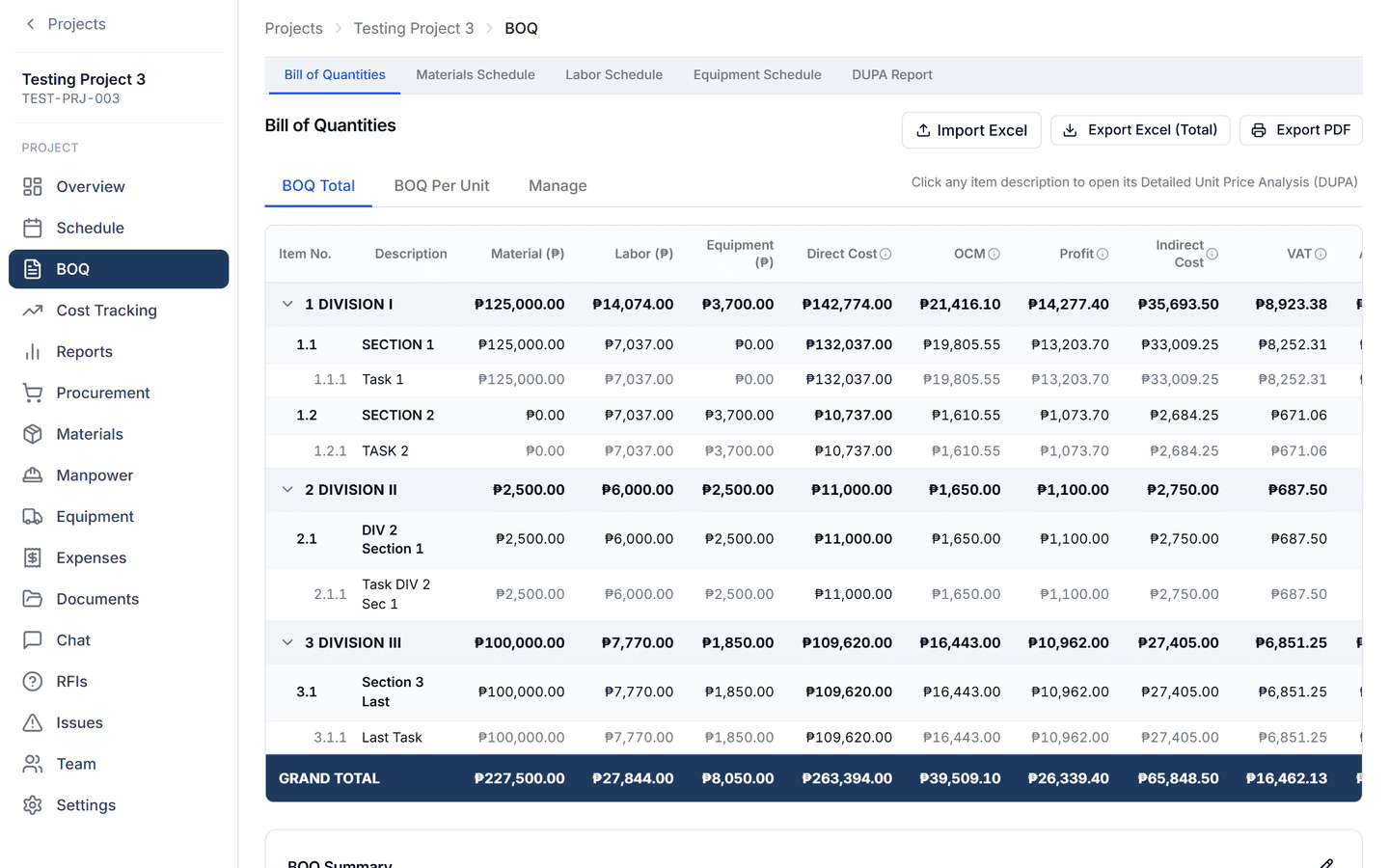
Build the Bill of Quantities in Division, Section and Item structure with DUPA-level unit price analysis. Approve it, and it becomes the budget every other module reads.
- BOQ and DUPA
- Divisions and sections
- Grand total with VAT and markup
- Approval
Plan and track
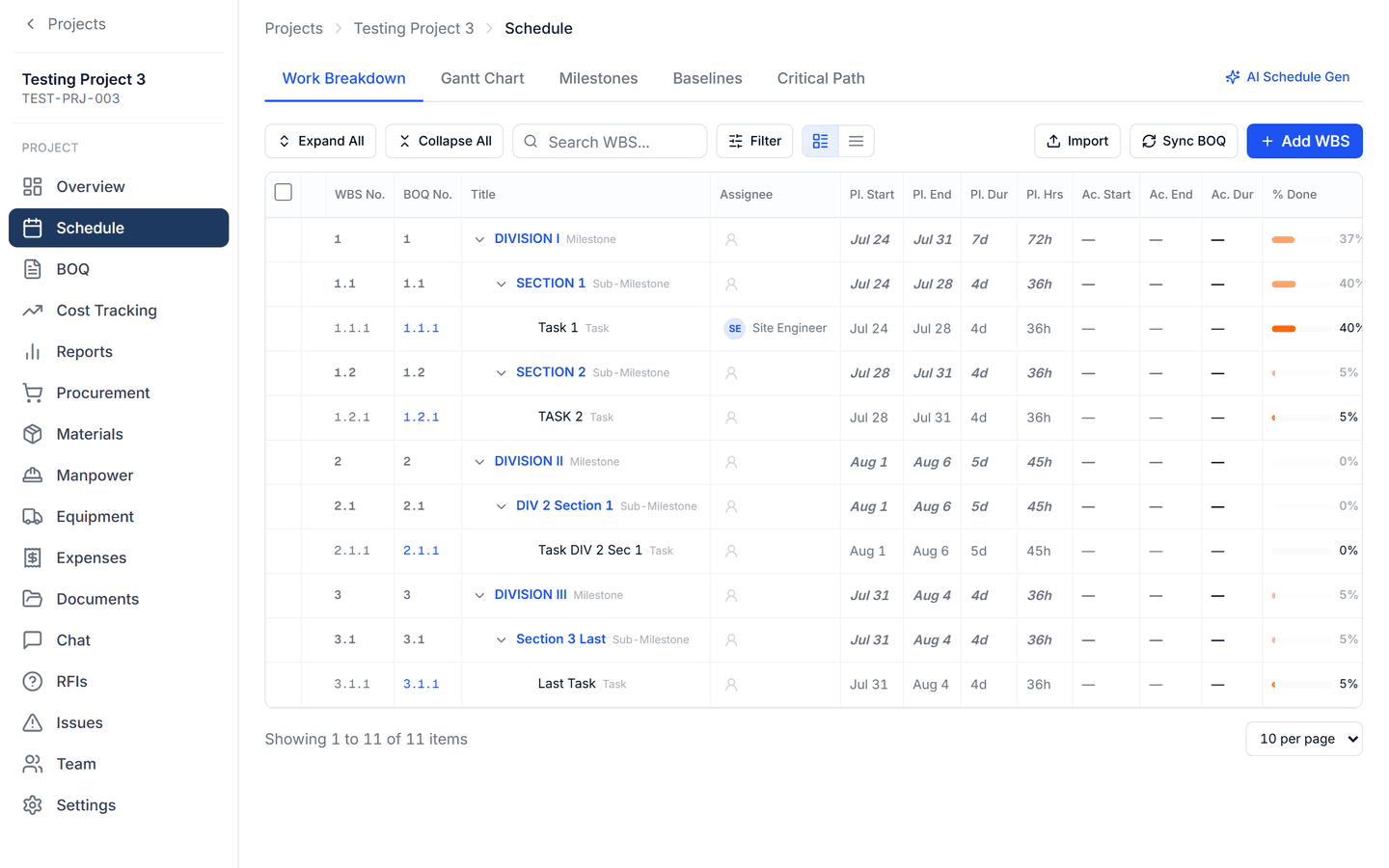
Turn the approved BOQ into a schedule. WBS, Gantt with a today line, and a weighted completion cascade that rolls site progress up to the project.
- Schedule and WBS
- Gantt with today line
- Weighted completion
- Critical path
Run the site
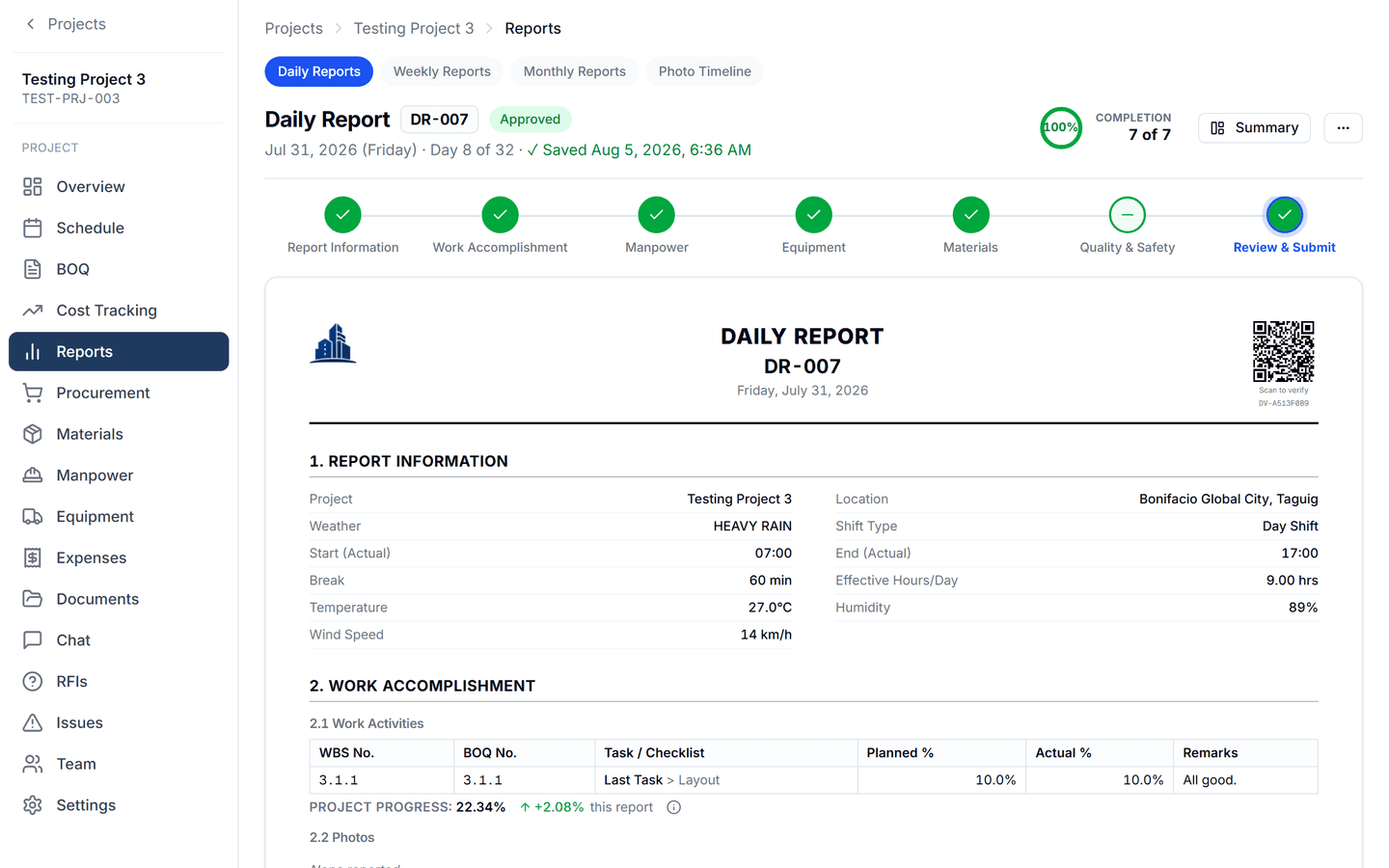
Site engineers file the daily report from a phone: manpower, equipment, materials issued, photos, inspections and issues, then submit it for approval.
- Daily reports
- Manpower and equipment
- Materials issued
- Photos, inspections, approvals
Control the money
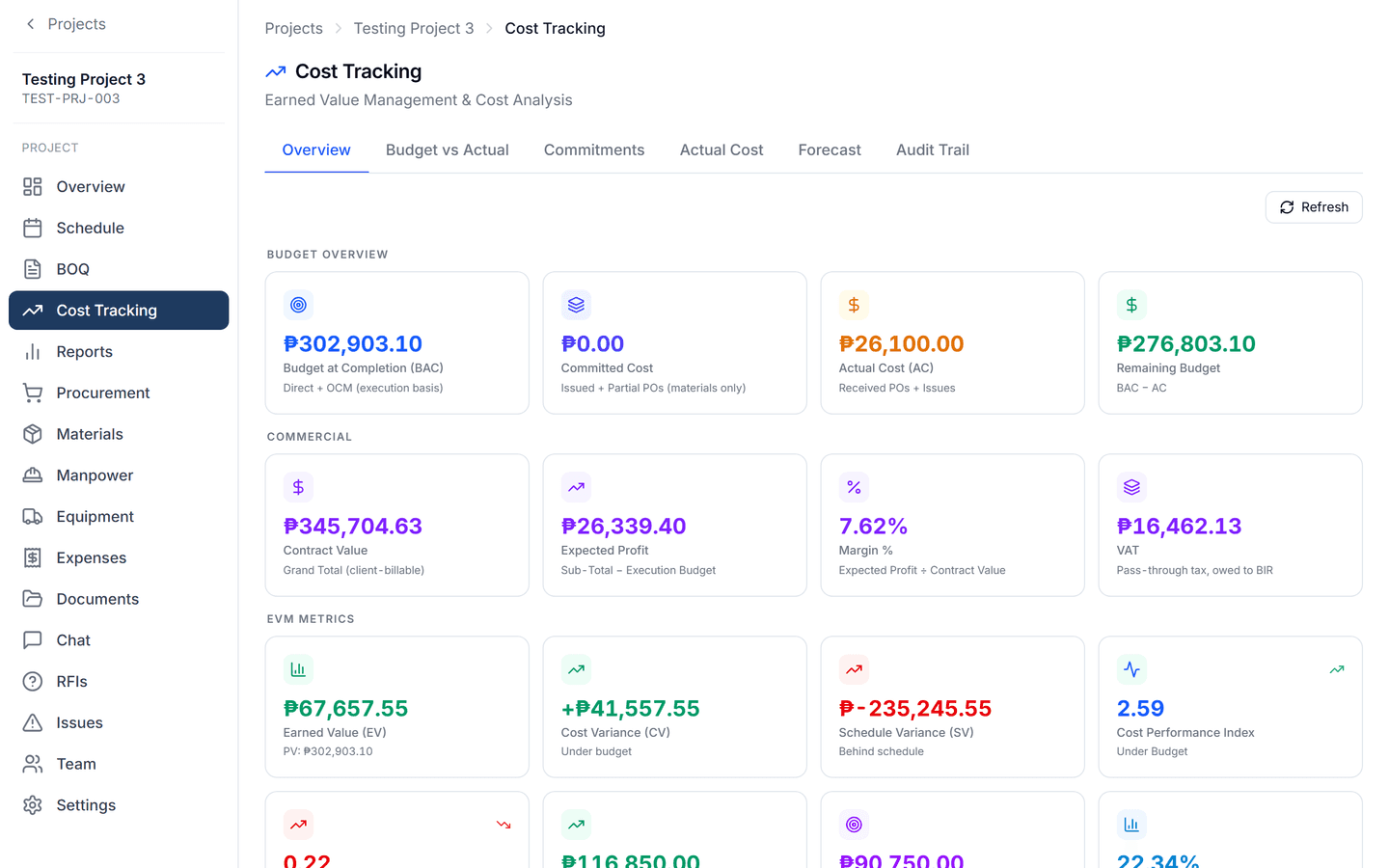
Procurement, purchase orders, receiving and inventory feed one cost picture. The EVM dashboard shows BAC, Committed, AC, PV, EV, CV, SV, CPI, SPI, EAC, ETC and VAC as the site reports.
- Procurement, POs, GRN
- Inventory
- Earned value dashboard
- Forecast at completion
Construction data your AI can actually use.
Most construction software adds a chatbot. CoNexa Pro captures the structure underneath — the BOQ, the schedule, the purchase orders, the daily reports, and who is allowed to see what. That structure is what lets AI summarise a week on site, flag a cost overrun before it grows, or draft the report your client is waiting for.
- Summarise daily and weekly site activity
- Draft the monthly report narrative
- Answer questions about a real project
- Flag cost and schedule exceptionsComing
Built for how Philippine contractors actually work.
- BOQ structure
- Division, Section and Item, with DUPA-level unit price analysis, the way government and private bids are actually prepared.
- Peso-native
- Every figure in ₱ with thousands separators, and VAT-exclusive pricing conventions handled explicitly.
- Local procurement workflow
- Purchase request, canvass, purchase order and receiving, with committed cost tracked from the PO.
- Site teams on mobile data
- Daily reports designed for a phone on a site with patchy signal, not a desktop in the office.
One system, six jobs.
Owner
See every project's cost position without asking anyone.
Operations Manager
Coordinate projects, procurement and people across the company.
Project Manager
Run the schedule, approve the reports, own the numbers.
Project / Site Engineer
File the daily report from the site, on a phone, in minutes.
Accountant
Work from committed and actual cost that ties to real purchase orders.
Warehouse Custodian
Issue and receive materials against the project that ordered them.
Simple plans. Start free.
Every plan includes a free trial. Prices are exclusive of VAT.
Starter
For small contractors getting their projects and site operations connected.
₱4,595/mo
per company, billed monthly
- 3 users
- Unlimited projects
- 300 AI credits / month
- 20 GB storage
- All core CoNexa Pro modules
- Email support
14-day free trial · No credit card required
Start free trial- Most popular
Business
For growing contractors managing multiple teams and projects.
₱8,995/mo
per company, billed monthly.
- 8 users
- Unlimited projects
- 500 AI credits / month
- 50 GB storage
- All CoNexa Pro modules
- Priority email support
14-day free trial · No credit card required
Start free trial Enterprise
For multiple divisions and custom requirements.
Custom
quoted per company
- Custom users
- Unlimited projects
- Custom AI Credits
- Custom storage
- Custom modules
- Dedicated onboarding and support
Designed around your organization's requirements
Talk to sales
Need help moving your operations to CoNexa Pro? We can help your team set up projects, configure workflows, migrate information, train users, and transition from spreadsheets and manual processes.
Questions contractors ask us.
No. CoNexa Pro runs in a browser, and site teams use it on their computer, laptop, tablet, and any mobile devices.
Yes. BOQ items can be entered directly or brought in from a spreadsheet, following the DPWH Division, Section and Item structure.
Financial information is controlled by role. Site and operational users can work without seeing rates, margins or commercial totals.
Each company works inside its own isolated workspace. Nobody outside your company can see your projects.
Choose a plan to continue. If you do not, your data stays available for export during the retention window described in our Terms.
Yes. Most contractors start with a single active project and expand once the site team is comfortable.
Yes, subject to the limits of your plan.
No. Course and LMS access is unchanged and is linked in the footer under Existing customers.